
Introduction
Most sales teams know which companies they want to reach. The hard part is finding the right people at those companies, with contact details that are current, accurate, and lawful to use.
Web scraping can automate that research. But a scraper pointed at the wrong sources, or run without validation, produces lists that bounce, duplicate each other, and create privacy risk. The difference between a useful contact dataset and a liability is the process around the scraper.
This guide covers that process: which fields to collect, where to collect them, how to extract and verify them, and how to stay compliant. It draws on how X-Byte builds contact data pipelines for B2B clients through its web scraping services.
What are the best practices for contact information extraction?
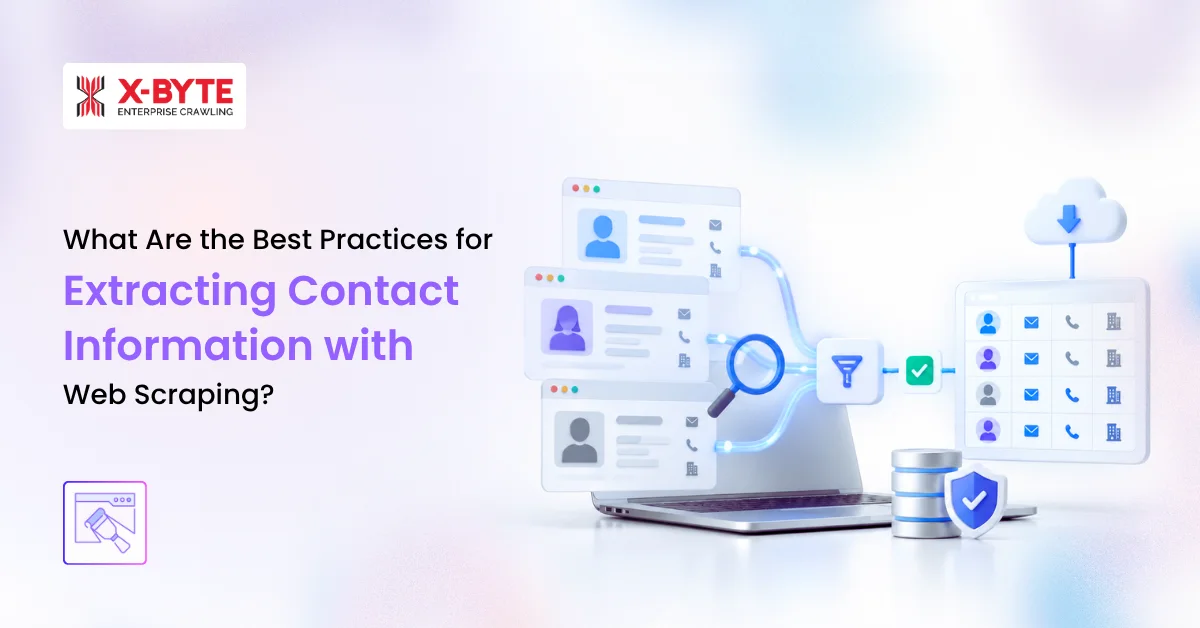
The best practices for extracting contact information with web scraping are to define your target profile and fields first, use only sources you are permitted to collect from, extract structured data before raw text, normalize and deduplicate every record, verify emails and phone numbers, record each record’s source and date, and handle personal data under GDPR, CCPA, and anti-spam rules.
- Define your ideal customer profile (ICP) and the exact contact fields you need.
- Choose sources whose terms allow collection, and license data where they don’t.
- Extract from structured markup first: schema.org data,
mailto:andtel:links. - Handle obfuscated and JavaScript-rendered contact details.
- Crawl responsibly: rate limits, robots.txt, and no scraping behind logins.
- Normalize every field to one standard format.
- Deduplicate records and resolve them to the right company.
- Verify emails and phone numbers before any outreach.
- Track each record’s source and refresh it before it decays.
- Deliver into your CRM with opt-outs and suppression lists synced.
What contact information can you extract with web scraping?
A useful B2B contact record combines person-level fields, company-level fields, and metadata about where and when the data was collected. Decide the schema before you crawl, because the schema determines which pages and sources you need.
| Field | Where it is usually found | How to validate it |
|---|---|---|
| Full name | Team, leadership, and about pages; speaker bios; press releases | Split into first and last name; check against the same person on a second source |
| Job title | Team pages, bios, press releases, conference listings | Map to a standard seniority (C-level, VP, Director, Manager) and department |
| Business email | mailto: links, contact pages, footers, author bios | Syntax, domain and MX check, SMTP check, catch-all flag |
| Phone number | tel: links, contact pages, location pages, directory listings | Parse to E.164 format; identify line type (landline, mobile, VoIP) |
| Company name | Page header, schema.org Organization markup, legal footer | Match to the company domain |
| Company domain | URL being crawled, email domain | Resolve redirects; one canonical domain per company |
| Location | Contact and location pages, PostalAddress markup | Standardize city, state or region, and country codes |
| Firmographics | About pages, directories, public registries, licensed APIs | Industry codes and employee-count ranges from one consistent taxonomy |
| Source URL | Captured by the scraper | Stored for every field, not just every record |
| Collected and verified dates | Captured by the pipeline | Used to schedule refreshes |
Collect only what your use case needs. Business contact details are enough for B2B outreach. Personal mobile numbers, home addresses, and personal social accounts add legal risk and rarely add value. Data minimization is also a legal requirement under GDPR.
Where to source B2B contact data
The best source is the one that is accurate for your ICP and that you are allowed to collect from. A company’s own website is usually both. Large platforms often restrict automated collection in their terms but offer licensed APIs or data products, which are the safer route.
| Source type | Best for | Typical fields | Terms and risk |
|---|---|---|---|
| Company websites (team, about, contact, leadership pages) | Decision-makers at known target accounts | Names, titles, business emails, office phones, locations | Low when public and crawled politely; review each site’s terms |
| Industry and association member directories | Niche verticals and local businesses | Company name, phone, address, category, sometimes a named contact | Varies; many prohibit bulk copying, so check terms |
| Government and public registries (business registries, licensing boards, regulatory filings) | Regulated industries, company verification | Legal name, registered address, officers, license status | Generally public records; reuse rules vary by jurisdiction |
| Conference speaker and exhibitor pages | Event-based prospecting | Names, titles, companies | Low to moderate; short shelf life |
| Press releases and news | Trigger events (funding, hires, expansions) | Executive names and titles, company news | Low; use as a signal, not a contact source alone |
| Maps, review, and listing platforms | Local and SMB targeting | Business name, phone, address, hours | Often prohibit scraping; use the official API where offered |
| Startup databases and professional networks | Tech companies, funding stage, job titles | Company profiles, team members, titles | Terms typically prohibit automated access; license the data or use the official API |
If a source offers an API, compare it with a custom crawler before you build. Our guide to API vs. custom data extraction covers the trade-offs. X-Byte’s lead generation data services (link: confirm URL) combine permitted sources into one dataset.
10 web scraping best practices for contact information extraction
Treat contact scraping as a pipeline, not a one-time extraction. Each practice below removes a specific source of bad data or legal risk.
1. Define your ICP and contact fields before you crawl
Start with the accounts and roles you want, not the sites you can scrape. Write down the industry, company size, geography, and the job titles or seniority levels that buy from you.
Then turn that into a field list with required and optional fields. For example: name, title, business email, and company domain are required; direct phone is optional. A clear schema keeps the crawl focused and stops it from collecting data you can’t use or justify.
2. Choose sources you are permitted to use
Before adding a source, check three things: its terms of service, its robots.txt file, and whether it offers an official API or data license. Prefer companies’ own websites, public registries, and sources whose terms allow collection.
Avoid any source that requires an account login to view the data. Logged-in scraping binds you to the platform’s user agreement, and that is where most legal disputes over scraping arise.
3. Extract structured data before raw text
Many websites already label their contact details in machine-readable form. Check these first, because they are more accurate than text matching:
- schema.org
Person,Organization, andContactPointdata in JSON-LD or microdata mailto:andtel:links- hCard or vCard markup on team and contact pages
Fall back to text extraction only when structured data is missing. Then use field-specific patterns and page context, such as the name and title in the same team-card element, rather than one regex across the whole page. X-Byte’s data extraction services use this layered approach.
4. Handle obfuscated and JavaScript-rendered contact details
Sites often hide emails from spam bots. Common patterns include name [at] company [dot] com, emails split across HTML elements, emails assembled by JavaScript, and email-protection scripts from CDNs.
Render pages in a headless browser only when the contact data loads through JavaScript; static HTML requests are faster and cheaper for everything else. If a site clearly signals that it doesn’t want addresses collected, respect that and leave it out.
5. Crawl responsibly
Responsible crawling protects the target site and your access to it:
- Limit request rates and concurrency per domain.
- Honor robots.txt directives and crawl delays.
- Identify your crawler with an accurate user agent.
- Crawl only the pages you need, such as team, about, and contact pages, not the whole site.
- Never bypass logins, paywalls, or access controls.
6. Normalize every field to one format
The same person can appear as “VP Sales”, “Vice President, Sales”, and “V.P. of Sales”. Normalization makes records comparable, deduplicable, and usable in your CRM:
- Emails: lowercase, trim whitespace, strip
mailto:prefixes. - Phone numbers: parse to E.164 international format, for example +1 312 555 0147 becomes
+13125550147. - Names: split into first and last name; handle prefixes and suffixes.
- Titles: map to standard seniority and department values.
- Locations: use ISO country codes and standard state or region names.
A normalized record looks like this (example data):
| Field | Value |
|---|---|
| First name | Maria |
| Last name | Lopez |
| Job title | Vice President, Sales |
| Seniority | VP |
| maria.lopez@example.com | |
| Email status | Valid |
| Phone (E.164) | +13125550147 |
| Company name | Example Corp |
| Company domain | example.com |
| Source URL | https://example.com/team |
| Verified on | 2026-10-20 |
7. Deduplicate and resolve entities
Scraping several sources always produces duplicates. Use the company domain as the main company key, then match people by normalized name plus domain or email. When two sources disagree, keep the most recently verified value and record both sources.
Also flag role-based addresses such as info@ or sales@. They are useful as company contacts but should not be counted as named decision-makers.
8. Verify emails and phone numbers before outreach
Verification is what turns scraped data into usable data. For emails, run checks in layers:
- Syntax check.
- Domain and MX record check, to confirm the domain can receive mail.
- SMTP mailbox check, without sending a message.
- Catch-all detection. Catch-all domains accept every address, so the SMTP result can’t confirm the mailbox exists.
- Risk flags for role-based and disposable addresses.
Label each result as valid, risky, or invalid rather than simply pass or fail. For phone numbers, validate the format for the country and identify the line type. Mobile numbers carry extra calling and texting rules in the US (see the compliance section).
If required fields are still missing, fill them through data enrichment (link: confirm URL): extra sources or licensed providers, queried in order until the field is filled.
Need a verified contact dataset for your ICP? X-Byte runs a free pilot run so you can check accuracy and coverage on a sample before committing.
9. Track provenance and refresh before data decays
Contact data goes out of date as people change jobs, companies rebrand, and phone systems change. Store the source URL and collection date for every field. This makes errors traceable, answers “where did you get my data?” requests, and tells you which records are due for a refresh.
Set a refresh cadence based on use. Records in active campaigns need more frequent re-verification than an archive kept for market analysis.
10. Deliver into your CRM with suppression lists synced
Push verified records to the systems your team works in, such as Salesforce, HubSpot, or an outreach platform, through CSV, JSON, an API, or a direct integration. Map fields to your CRM schema and include verification status, so reps know which records are ready to use.
Before every delivery, check new records against your opt-out, unsubscribe, and do-not-contact lists. A person who opted out must not reappear because a new crawl found them again.
Is it legal to scrape contact information? A compliance checklist
Publicly visible does not mean free to use. A named person’s business email and phone number are personal data under major privacy laws, and how you collect and use them matters as much as where you found them. This section is general information, not legal advice; review your use case with counsel.
| Law or rule | Applies when | What it means for scraped contacts |
|---|---|---|
| GDPR / UK GDPR | You process data on people in the EU or UK | You need a lawful basis, usually legitimate interest with a documented balancing test. When data isn’t collected from the person directly, Article 14 requires telling them who you are, why you hold their data, its source, and their rights. |
| CCPA / CPRA (California) | You meet the law’s business thresholds and hold data on California residents | The B2B contact exemption expired on January 1, 2023. Business contacts now have the same rights as other consumers, including notice, access, and deletion. |
| CAN-SPAM Act (US) | You send commercial email | The FTC is clear that the law has no B2B exception. Emails need accurate headers, a physical address, and a working opt-out honored promptly. Using harvesting software on sites that say they don’t share addresses is an aggravated violation. |
| CASL (Canada) | You email recipients in Canada | Consent-based. Scraped addresses generally can’t be emailed without consent, and Canadian law restricts collecting addresses with harvesting tools. |
| TCPA (US) | You call or text, especially mobile numbers | Autodialed or prerecorded calls and texts to mobiles need prior consent. Flag line type during verification. |
| Website terms and access rules | Every source you crawl | Terms bind account holders more strongly than logged-out visitors. In Meta v. Bright Data (2024), a federal court held that Meta’s terms did not cover logged-off scraping of public data. Logged-in scraping remains high-risk. |
Operational checklist
- Collect only public business contact data that your use case needs.
- Never scrape behind logins, paywalls, or access controls.
- Document your lawful basis and legitimate interest assessment for EU and UK contacts.
- Store the source and collection date for each record.
- Give a clear privacy notice and an easy opt-out in the first message.
- Sync opt-outs and suppression lists across every crawl and tool.
- Set retention limits and delete records you no longer use.
- Sign a data processing agreement with any vendor that handles the data.
X-Byte collects only publicly available business information, keeps source records for every dataset, and works within each client’s compliance requirements.
Contact data quality metrics to track
You can’t improve a contact dataset you don’t measure. Track these metrics on every delivery, and sample records for manual review.
| Metric | What it tells you | How to calculate it |
|---|---|---|
| Field fill rate | Coverage of each required field | Records with the field ÷ total records, per field |
| Field accuracy | Whether values are correct | Correct values ÷ values checked in a manual sample |
| Email validity rate | Share of emails safe to send | Valid emails ÷ emails verified |
| Bounce rate after sending | Real-world email quality | Hard bounces ÷ emails sent; many senders aim to stay under 2% |
| Duplicate rate | How well records are merged | Duplicate records ÷ total records |
| ICP match rate | Whether you collected the right people | Records matching ICP criteria ÷ total records |
| Freshness | How current the data is | Median days since last verification |
For a deeper framework, see our guide on how to measure data extraction quality at scale: accuracy, coverage, and freshness.
In-house contact scraper vs. managed data service
An in-house scraper makes sense for a few stable sources and a team with engineering time. A managed service makes sense when you need many sources, ongoing refreshes, and verification without building and maintaining the pipeline yourself.
| Factor | In-house scraper | Managed service (such as X-Byte) |
|---|---|---|
| Setup time | Weeks to build, test, and harden | Days to scope and run a pilot |
| Maintenance | Your team fixes breakage when sites change | Provider monitors and repairs crawlers |
| Verification and enrichment | Separate tools and integrations to buy and connect | Included in the pipeline |
| Scale | Limited by your infrastructure and engineering time | Built for many sources and high record volumes |
| Compliance controls | You design source review, provenance, and suppression yourself | Defined process, documented sources, and agreed data handling |
| Best fit | One-off projects, few sources, in-house data engineers | Recurring lead data, many sources, teams focused on selling |
Our build vs. buy guide walks through costs and decision criteria in more detail.
Frequently Asked Questions
 ✯ Alpesh Khunt ✯

Related Blogs
How to Prepare Reliable Web Data for AI Agents and RAG Applications
Web Data Extraction API vs. Custom Data Extraction: Which Approach Fits Your Project?